

How To Log On To Windows 2000 Without A Password
DreamPackPL allows any user to featherbed Windows login security and logon to Windows XP or Windows 2000 figurer even though the user accept forgotten or lost the valid password, and without the demand to reset or alter or change the existing passwords that are currently set with the accounts. DreamPackPL (version 2oo4.o6.1o or v2.thirty) is actually built on DreamPack which consists only the hacked and patched sfcfiles.dll, just with graphical user interface (GUI) and built-in function to create an ISO image that can be burnt to CD. DreamPackPL is bachelor as free download. When executing, DreamPackPL has 3 options:
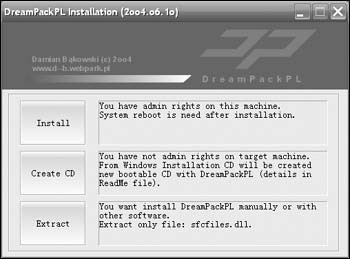
The starting time option, Install (need administrative rights) will install DreamPack and automatically supervene upon original sfcfiles.dll with patched version of sfcfiles.dll. After reboot, DreamPack will turn off Windows logon countersign check so that user tin can virtually access to every local account without knowing the countersign and modifying the password.
The second pick, Create CD will create a new bootable CD with DreamPackPL by using original Windows (Windows XP or Windows 2000, both will work to get access to Windows XP or Windows 2K) installation CD. The CD ISO prototype creation process with DremPackPL can only exist washed in Windows 2000/XP, and free infinite of at least 400-600MB is needed. After the ISO epitome file is created, it has to be burnt to CD by using any CD burning or writing program such equally Alee Nero. Alternatively, just download the pre-created bootable dreampackpl_iso.zip (download link beneath) which pre-loaded with patched sfcfiles.dll to featherbed the Windows logon security check. Excerpt the aught file to get the ISO image and then burn the image to a CD.
Choice 3 will excerpt SFCFILES.DLL file to selected path, which can be used to manually supercede the original SFCFILES.DLL on the target system's \Windows\System32 binder if user can boot the arrangement using other software such equally bootable DOS, BartPE, PE or XPE and the organisation uses Fat partition.
For the post-obit hack into Windows XP and Windows 2000 machine without valid password yet not reset whatever password tutorial, we'll follow pick two.
- Physical access to the target destination PC is a must.
- Download DreamPack PL:
Executable: dreampackpl20040610.cypher
Patched ISO: dreampackpl_iso.zipIf you're downloading the DreamPackPL executable, create a patched bootable ISO image.
- Burn or write the ISO image to CD / DVD / USB flash bulldoze.
- Afterwards the boot CD disc is created, restart the PC, and kicking from the CD/DVD bulldoze or USB.
- User will come up to Windows 2000 (or Windows XP) Setup screen.
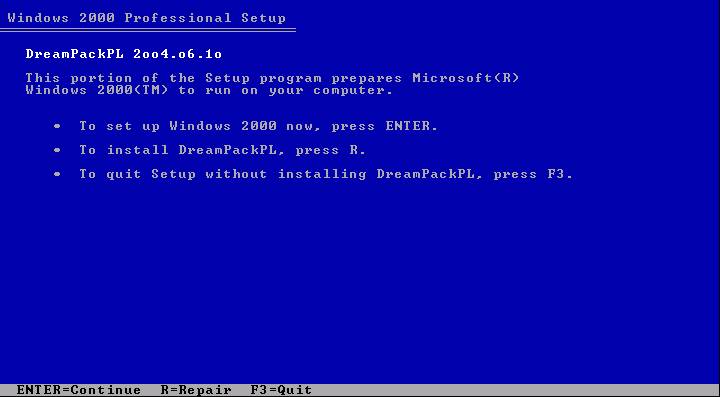
- User must load system in Recovery Console, so press R to keep and install DreamPackPL.
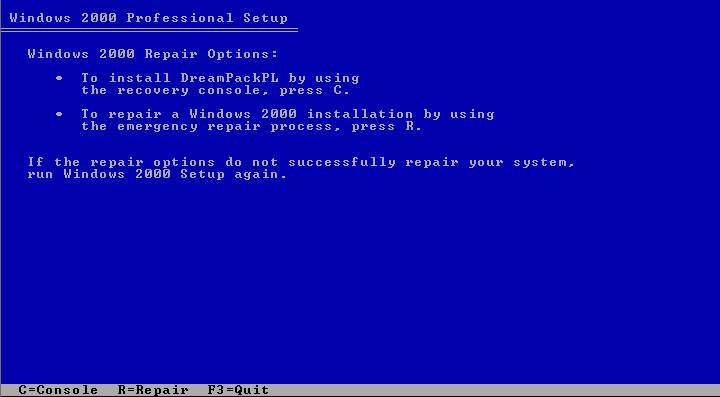
- Press C to install DreamPackPL by using Recovery Panel.
- Then select which Windows (Windows XP or Windows 2000) installation that desire to log onto by keying in appropriate number (normally 1 for system with only one Windows installation).
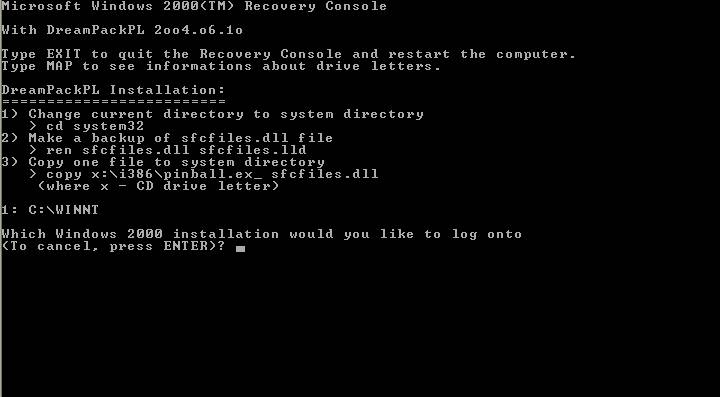
- Key in whatever countersign when prompt for Ambassador password.
- Make a backup of the original sfcfiles.dll past using the following control:
For Windows XP:
ren C:\Windows\System32\sfcfiles.dll sfcfiles.lld
or
For Windows 2000:
ren C:\Winnt\System32\sfcfiles.dll sfcfiles.lld
- Copy the patched sfcfiles.dll file from the CD to \Windows\System32 (or \WinNT\System32 depending on your Windows installation) binder by using following control (CD drive in this example is D, modify according to your CD drive letter. Yous can use "map" command to display all drive letters):
For Windows XP:
copy D:\i386\pinball.ex_ C:\Windows\System32\sfcfiles.dll
For Windows 2000:
copy D:\i386\pinball.ex_ C:\Winnt\System32\sfcfiles.dll
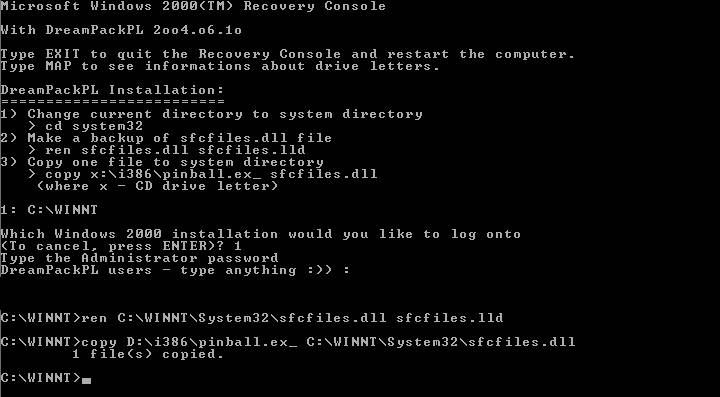
- Type "Leave" and press Enter to get out from Recovery Console, and restart the PC, and permit the Windows boot normally.
- One time Windows display Windows Logon prompt, key in "dreamon" DreamPackPL control (without quotes) in the user name or password field to brandish the DreamPackPL menu.
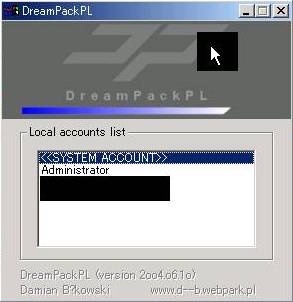
- Click on the top graphic on the DreamPackPL menu to display the commands options and configuration menu.
- Navigate to Command and click on Command Setting options.
- Enable the God-Password setting by selecting (cheque) the tick box at the finish.
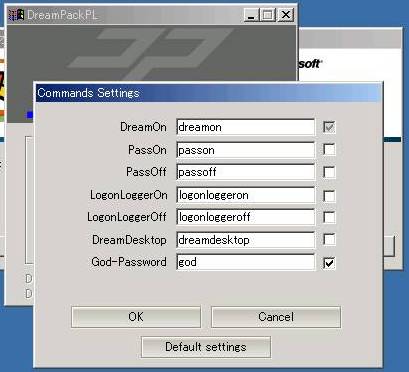
- Leave from all DreamPackPL and type "god" in the user name or countersign field on Windows Logon screen to log on into Windows, bypassing all users or administrator account password.
- Another option is to navigate to Countersign at DreamPackPL commands settings menu and select (check) the "Logon with incorrect countersign and hash" option, which allows user to log-in into Windows using any administrator or user account with any right or wrong password.
DreamPack or DreamPackPL has the following features:
- Configurable command interpreter in logon window (DreamOn, PassOn, PassOff, LogonLoggerOn, LogonLoggerOn, LogonLoggerOff, DreamDesktop, God-Password)
- Three logon modes: standard with countersign, with wrong countersign and wrong hash (LM+NT), with given hash (LM+NT)
- Hash Audit (show hashes of all users) and Hash Figurer
- Executing programs at the logon desktop with arrangement privileges
- Loading Explorer trounce at new desktop and work with system privileges
- Logon Logger (engagement and time, user name, password, character codes in password)
- Disabling Windows File Protection (always when using DreamPack).
Notation: You may need to disable the anti-virus protection software in club to use DreamPackPL to bypass Windows password logon security cheque to login into Windows system without whatsoever password modification or reset to existing accounts' passwords, nor leave any trace of logging on. DreamPackPL can exist easily uninstall past choosing Uninstall from commands card, and the original sfcfiles.dll will be automatically recovered from sfcfiles.lld backup file.
Update: Means to reset or recover your lost password
Nigh the Writer: LK

Source: https://techjourney.net/log-on-to-windows-xp-windows-2000-bypass-existing-password-with-dreampackpl/
Posted by: elliottcoccousturia1984.blogspot.com
0 Response to "How To Log On To Windows 2000 Without A Password"
Post a Comment