

How To Find User Password In Windows 7 Using Cmd
How to Reset Windows vii Password Using Command Prompt
Do you know command prompt can be run in different cases in Windows seven calculator and reset Windows 7 login countersign effectively? If you have no thought, delight learn to run Command Prompt hither in three cases. Then you would become 3 effective ways to reset Windows 7 password using Command Prompt.
- Instance 1: Run command prompt in attainable computer
- Case 2: Run command prompt in rubber mode
- Case three: Run command prompt on login screen - Reset forgotten password (Recommend)
Way 1: Reset Windows 7 administrator countersign with command on accessible computer
While you have accessed computer with administrator, now just open command prompt with it in Windows 7. If not, you lot can switch to log in Windows seven with admin account at first and then run command prompt, or run control prompt with congenital-in administrator instead.
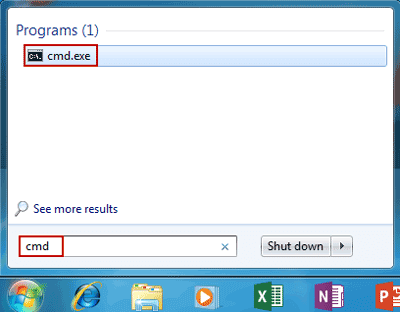
one. Click Start and blazon "cmd" in search box, then right-click "cmd.exe" and Run equally administrator.
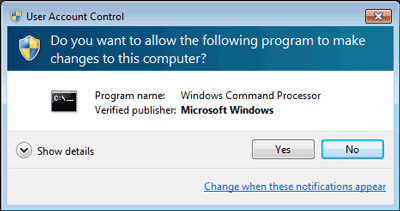
two. Click Yep on popular-upwardly UAC dialog and successfully run Command Prompt.
iii. Enter net user command to reset Windows 7 administrator password.
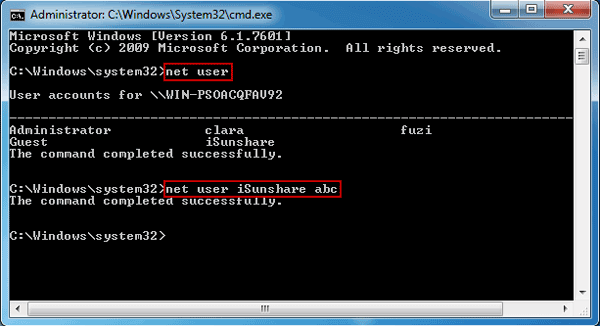
If yous don't know what the Windows 7 user accounts are, type command net user firstly to view all the user accounts. Then change password for specified user account. For example, if you want to create new password for user "iSunshare", just need to enter command " internet user iSunshare newpassword " and press Enter. From then on, when log in Windows vii with user "iSunshare", you have to enter its new password.
Fashion 2: Reset Windows 7 countersign with command prompt in safe mode
While Windows 7 reckoner cannot showtime usually, or you just want to run Windows 7 in safe mode to apply command prompt, follow this way.
Step 1: Start estimator and press F8 while the computer boots up.
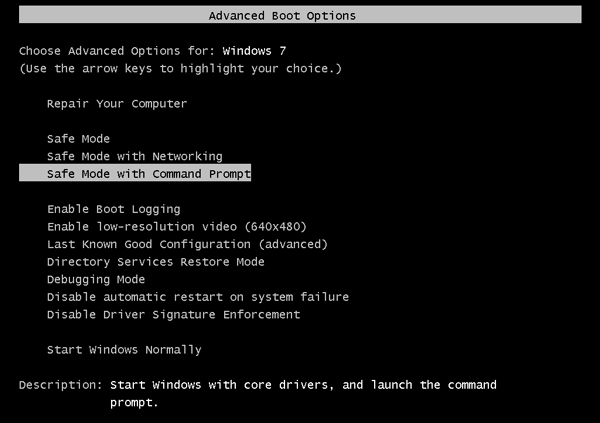
Step ii: When Advanced Boot Options screen appears, select Safe Mode with Command Prompt and press Enter. So your computer will beginning in prophylactic mode with control prompt.
Step three: Run command prompt with default Administrator privileges.
More often than not, Administrator is disabled and has no password protection by default. Then normally yous don't need to choose Administrator and enter its password. But if y'all see, please select Ambassador on login screen and enter control prompt. Then Control Prompt volition be run as Administrator automatically.
Stride iv: Reset Windows seven countersign with command prompt just like way one on accessible computer.
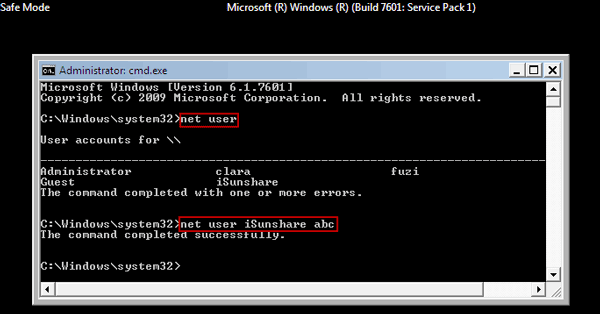
Note:
If this mode still cannot assistance you to reset Windows seven countersign using command prompt because of built-in ambassador password forgot, please try manner 3 or get constructive Windows 7 Countersign Genius to straight remove Windows 7 forgotten countersign from locked calculator.
Fashion iii: Reset Windows 7 password with command prompt on login screen
If Windows seven figurer is locked, can control prompt exist run to reset Windows 7 forgotten password? The answer is yes, but the functioning volition be a little complicated. Now this fashion will walk you through how to reset forgotten countersign with command prompt on locked Windows 7 reckoner footstep by step. If you want a software to reset Windows seven password hands, please see Reset Admin Password for Windows 7 with Recovery Tool.
Pace 1: Force power off your computer.
Get-go your computer and when you meet it saying Starting Windows. Concur down the Power button for at least 5 seconds to force ability off your computer.
Step 2: Restart computer and choose "Launch Startup Repair (Recommended)".
Next fourth dimension, when yous ability on your calculator, ii options volition be bachelor, launch startup repair and offset normally. If you take no admin countersign to admission figurer, please cull the recommended option.
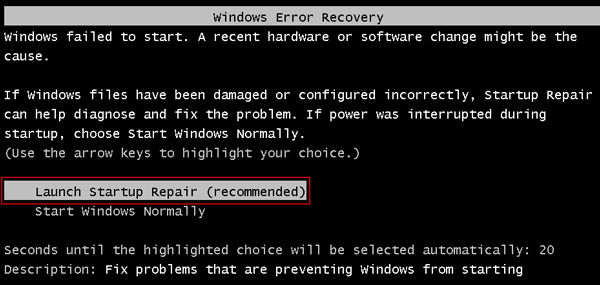
Note: Startup Repair volition boot up and when it asks if you lot want to restore figurer, click "Cancel" button.
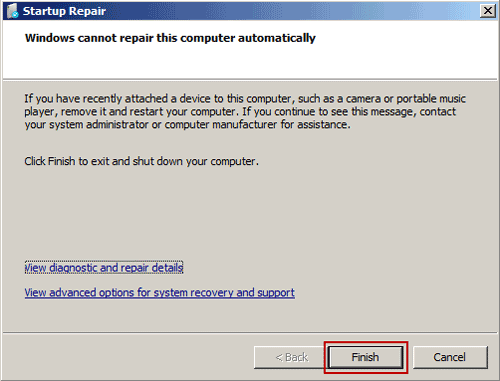
Pace iii: Click on "View problem details" while Startup Repair cannot repair computer automatically.
Startup Repair tool automatically checks the system problems and tries to set up them. After a long time, you will get a dialog saying that Startup Repair cannot repair this computer automatically. Click on View trouble details.
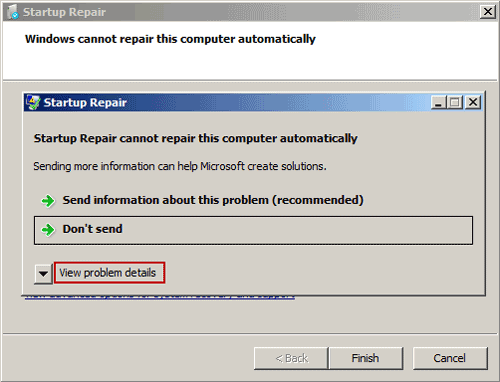
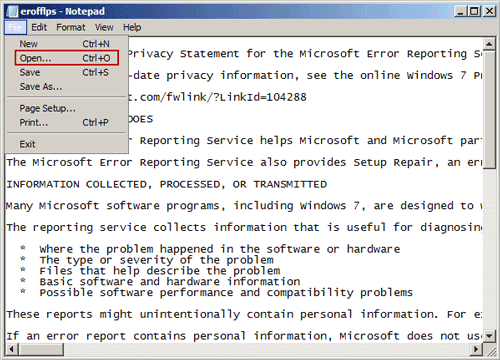
Stride 4: Pop upwardly "File Open" dialog past opening Microsoft'due south offline privacy statement in notepad.
i. Click the final link to read Microsoft's offline privacy statement in notepad.
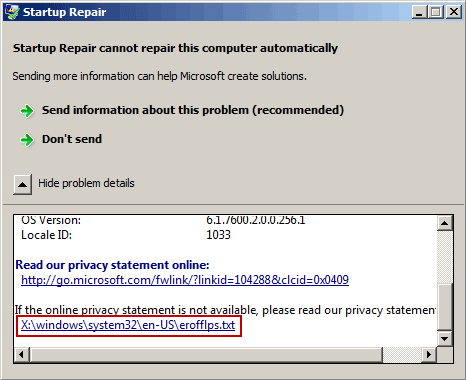
2. Click on the File card and Open in notepad. Then File Open dialog box would pop upwardly.
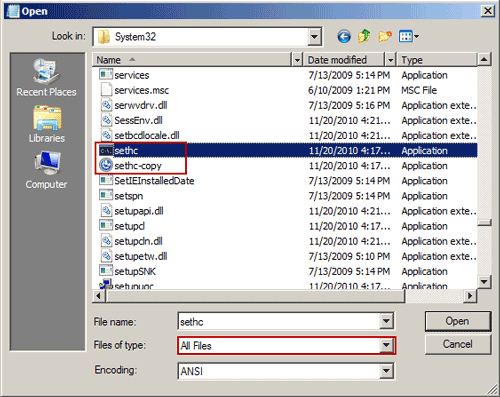
Step 5: Run command prompt instead of Sticky Keys application on login screen.
1. Modify the File of blazon option to All Files and scan to C:\windows\system32\sethc.exe. Rename this file equally a backup, just similar "sethc-copy".
two. Notice the cmd.exe file in the aforementioned binder and rename it to sethc.exe.
three. Shut all the dialogs, click Cease push button and computer restarts.
4. Once go to Windows seven login screen, hit the Shift key 5 times and Command Prompt volition be opened instead of Sticky Keys application.
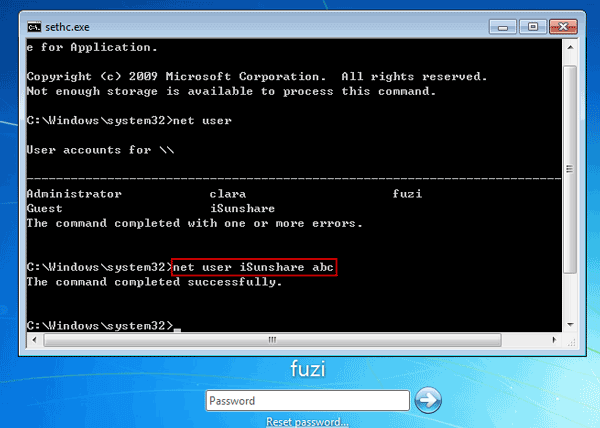
Step 6: Reset Windows 7 password with command prompt.
After Windows vii countersign reset with command line, you can follow footstep 1-five once again to restore sethc.exe and cmd.exe.
Tips:
Control Prompt used above applies to all Windows 7 user password reset, because there is but local user available in Windows vii computer. But if you have upgraded Windows vii to Windows eight/x, and Microsoft account is used on computer, the control prompt would still only work for local account, but not Microsoft account. And then if y'all want to reset forgotten Microsoft business relationship password, just could take other ways, such as Windows Password Genius Advanced or Microsoft account password reset folio.
Related Links:
- Windows 7 Admin Password Reset with three Ways
- Reset Windows ten Local Admin Countersign Using Control Prompt
- Forgot Dell Windows 7 Login Password, How to Do?
Source: https://www.isunshare.com/windows-7-password/reset-windows-7-password-with-command-prompt.html
Posted by: elliottcoccousturia1984.blogspot.com
0 Response to "How To Find User Password In Windows 7 Using Cmd"
Post a Comment